Tôi Yêu Đồ Họa 3D

Showing posts with label Plugins-3Ds-Max. Show all posts

Monday, 17 July 2017

Download - Ornatrix v4.4.0 cho 3ds max 2011-2017

Ornatrix v4.4.0


Info:
Ornatrix is a system designed to solve the problem of creating hair and hair-shaped structures. To achieve this goal it employs a variety of tools and automation to allow the user to work in an easy and intuitive environment.
Computer imagery has presented us with many possibilities to simulate our own world and to synthesize new experiences and rich visual information. One of the biggest tasks of CG is to create realistic characters. After all it is living beings that connect us with what we see on an emotional and psychological level. While there have been many advances in the quality and speed of such simulations some things still remain just slightly out of reach for full control. CG model structures often consist of recognizable shapes that we can easily manipulate through modeling techniques which have now been developed for decades.
However, we often tend to ignore the subtle detail that these structures carry. Our world is full of such detail and it is absolutely indispensable to achieve photo realism. Techniques and tricks have been developed to cheat this detail to some extent [1]. However, as we strive towards realism at less expense put into computing power more accurate models need to be introduced. Hair and fur has been one of the biggest problems in CG since the problem was first studied in 1980’s. Since then many strives have been made in simulating realistic hair.
The purpose of Ornatrix and this documentation is to bring you (the user) as close to achieving perfect results as possible with putting the technical side of things inside. So leave your skepticism and frustrations behind, put on your hairdresser hat (if you have one), and let your imagination and inner stylist roam free. The main purpose behind Ornatrix is to make it as much fun for the user to explore the art of virtual hairdressing as possible.
Install Instructions:
– Disconnect from the internet during installation.
– Run setup and uncheck the unwanted 3dsmax versions, then install it.
– Run license and just install License server.


Nguồn: cgpersia.com

Cảm ơn bạn đã ủng hộ!

Thursday, 4 May 2017

Plugins - Wrapit 1.58 cho 3ds max 2009 -2017

Wrapit 1.58 


What is Wrapit?

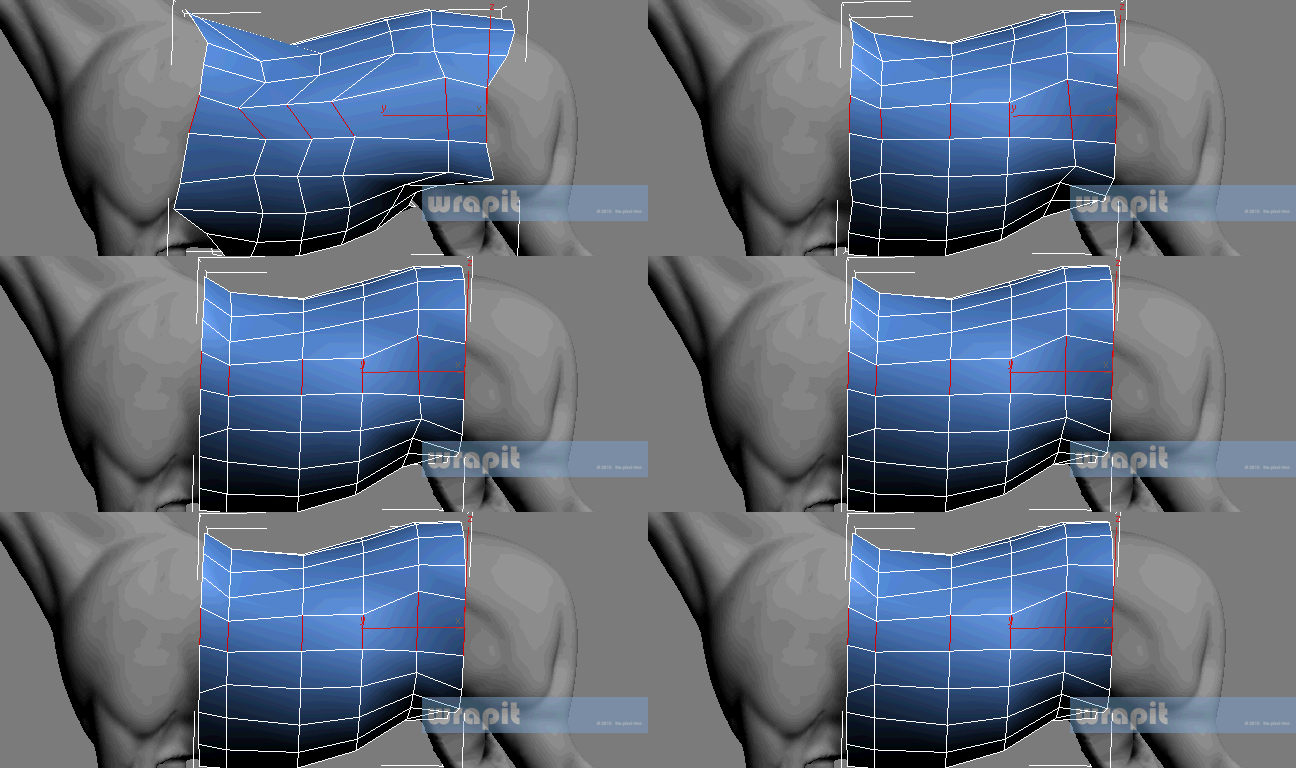
Wrapit is a 3ds max tool for conforming meshes to other meshes. This lends itself to various scenarios such as retopologising high-res meshes like those created in Zbrush, Mudbox, 3d Scan data etc, and creating low poly proxies for situations where those are preferable, eg. collision detection, LODs etc.

Wrapit's strength lies in allowing you to use the full set of 3ds max's editable polygon tools, including the already great Graphite tools, whilst working on the surface of a target object. In that respect it’s it’s ease of use is second to none; you can use all your familiar 3ds max working methods, whilst Wrapit keeps things snapped to the surface of your high poly object. Wrapit uses 3 different projection modes to conform the meshes; The super fast 'Closest Point','Vertex Normal' and 'Screen Space', each catering for specific projection needs.

But of course Wrapit does bring some additional tools to the table for 3ds max:

QuadGen automatically creates quad based meshes from existing high poly objects, and can even project uv coordinates and materials from those meshes onto your new geometry.


Strip Painting allows freehand or controlled placement of polygon strips to flesh out topology.


Branch Painting is used to quickly retopologise areas of your target mesh which are essentially cylindrical, things like arms, legs, fingers, horns, tusks, trunks, tentacles etc.


Extend Edge is used to automatically extend open edges over the surface of your high poly target object.


Relax Over Surface works just like normal relax, but slides your mesh over the surface of the High Poly target mesh. Here we see a cylinder projected onto an arm; the initial projection is uneven due to the contrasting mesh volumes, but relaxing helps even things out.


Planar Loops Flattens out edge loops in either X,Y,Z or local axis, whilst sticking the the surface of the high poly object:


Check out the Gallery and testimonial sections to see how Wrapit has already been production proven, and is winning over the 3ds Max modellers.

Download


Cảm ơn bạn đã ủng hộ (Thanks you)


Nếu links die hãy comment phía dưới...

Maxscript - Animators Tool Kit v1.02 cho 3ds Max 2010 - 2017

Animators Tool Kit


Just install & enjoy:
- Drag&drop the MZP file into 3dsmax window or run it from the menu Maxscript -> Run Script ( Run 3dsmax as Admin! )
- Press "Install" button
- Find the "ATK" category in "Customize User Interface" dialog

Download


Cảm ơn bạn đã ủng hộ (Thanks you)


Nếu links die hãy comment phía dưới...

Plugins - TurboReverse 1.0 - 3ds max 2008 - 2018

TurboReverse 1.0


TurboReverse is a 3ds Max modifier that has the opposite effect of TurboSmooth. It will recreate the subdivision levels of an already subdivided mesh with 100% precision maintaining the existing UVs.
It is the successor of Subdivision Reversion maxscript.

It is now 100 times faster, being a native 3ds Max plugin, not a maxscript anymore.
It has the ability to reverse just parts of your models based on your selection.
It can reverse multiple iterations at a time.
Here are some of the benefits you get:

If a 3d model you buy online has it's modifier stack collapsed it is almost useless, you can't edit, unwrap, rig it, but with TurboReverse you can reconstruct the first subdivision level and then do all the above.
If in your production pipeline you need at some point to collapse the model with TurboReverse you can get the subdivisions back later.
When you apply a turbosmooth modifier to a reconstructed subdivision level you will get exactly the same mesh as the original.
Situations in which you would want to use TurboReverse:

When you have a subdivided model which has his modifier stack collapsed.
When you bright a model that has been subdivided in ZBrush, Mudbox, Maya etc. into 3ds Max.

Download


Cảm ơn bạn đã ủng hộ (Thanks you)


Nếu links die hãy comment phía dưới...

Wednesday, 3 May 2017

Plugins - Xây dựng thành phố cực dễ với GhostTown 1.31 cho 3ds Max 2012 - 2017

GhostTown 1.31


Info:

Buildings
Drag&drop facades on building faces or randomly assign them to buildings in the Building node

Facades
Create complex facades with the NodeEditor.
Parts of the facade can be saved as prefabs, for easy use in other projects. Materials can be saved in the materialLibrary, and assigned directly in the facade project.
Roads
Create simple spline-based roads that follows your terrain. Assign different road classes, create overpasses and lots.
All roads are editable between max sessions.

Download

Nguồn: cgpersia.com

Cảm ơn bạn đã ủng hộ (Thanks you)


Nếu links die hãy comment phía dưới...


Plugins - UnwrapPro 1.02 cho 3ds max 2008 - 2018

UnwrapPro 1.02


Unwrap Pro is a 3ds Max plugin which unwraps meshes while producing low distortion, overlap free, weighted density UVs unlike the 3ds Max Peel command which produces overlapping UVs with high area distortion.
It is very fast (a 1 million triangle mesh was unwrapped in 23 seconds). It is easy to use (just select some UVs and hold down a button).
Unwrap Pro will not add seams or pack UVs for you.

Here are some of the benefits you get:

Save time and energy while unwraping meshes by not having to worry about distorted or overlaping UVs.
Use vertex colors or soft selections to increase the pixel density of important features.
You don’t have to manually edit or pin UVs to produce great results.
Fast high quality UVs at a button press.
Situations in which you would want to use Unwrap Pro:

When you want to have equal pixel density for your textures.
When you don’t want to manually edit UVs.
When you want to have more or less pixel density in some areas.
When you want fast and quality UVs.
When you don’t want to manually untangle UVs.

Download

Nguồn: cgpersia.com

Cảm ơn bạn đã ủng hộ (Thanks you)


Nếu links die hãy comment phía dưới...

Plugins - PolyUnwrapper 4.2.7 cho 3ds max 2010 - 2017

Advanced UV Normalizer v2


PolyUnwrapper is a complete set of professional tools designed for the texture artists, especially for the architectural and game industries.
It contains plenty of features that will greatly help you improve your unwrapping workflow.

What's New in Version 4.2
Added support for 3ds Max 2017
Align Shells: Shells can now be aligned to the 0-1 space as a group
Added Get Render size from current texture map
Settings Manager UI
Advanced UV Shells Randomizer
Expand Selection By Smoothing Group now works with strict groups too
Render custom UV Tile (with UDIM nomenclature)

Home: http://www.polytools3d.com/

Download

Nguồn: cgpersia.com

Many thanks to the secret donor!

Cảm ơn bạn đã ủng hộ (Thanks you)


Nếu links die hãy comment phía dưới...

Plugins - Advanced UV Normalizer v2 cho 3Ds Max 2010 - 2017

Advanced UV Normalizer v2


Advanced UV Normalizer (AUVN) is a tool for normalizing the Texel Density across different objects.
It has a comprehensive set of features to calculate, get, set and modify the Texel Density of your models based on different parameters such as Geometry Area, Texture Area, UV Area as well as the Geometry/Pixels and Geometry/UVs Ratios.

The Texel Density can be set using a fixed texture size, or you can assign different AUVN textures and normalize them all at once using their texture size.
Download

Nguồn: cgpersia.com

Many thanks to CLRPizzas !

Cảm ơn bạn đã ủng hộ (Thanks you)


Nếu links die hãy comment phía dưới...

Monday, 3 April 2017

Plugins - SitniSati FumeFX v4.0.4 CHO MAX 2013-2017 WIN

SitniSati FumeFX v4.0.4


FumeFX 4.0 offers many new features that help simulations to run faster and with more detail.
The new FumeFX 4.0 QCG solver is up to twice as fast as the CG solver found in FumeFX 3.0. Along with other simulation optimizations, FumeFX 4.0 can complete simulation faster than any previous version of FumeFX.
New vorticity type has additional control over vortices which helps user to fine tune the final result. The highly optimized Spline Follow force field allows various special effects that were impossible before.
Built-in Black-body radiation shader and new burning model that includes Oxygen are powerful tools for achieving realistic fire and explosion animations. Sharpening at render-time will bring out maximum possible detail from your existing caches. Fully multithreaded cache pre-processing at render time will result in significant time savings across the render farm.
Features such as faster solver, advanced vorticity, new burning model, smoke and fire sharpening at render time, fields sharpening at simulation time, improved caches handling and many other will allow users to create more detailed simulations in less time.


Home: https://www.afterworks.com/FumeFX/Overview.asp
Download

Nguồn: cgpersia.com

Cảm ơn bạn đã ủng hộ (Thanks you)


Nếu links die hãy comment phía dưới...

Sunday, 2 April 2017

Plugins - XRayCat Survival Toolkit v1.5 cho 3Ds Max (****)

XRayCat Survival Toolkit v1.5


Instalation
1. Drag&drop it to 3dsmax window or run it from menu Maxscript -> Run Script and press "Install"
2. Find the “RaylightTools” category in ”Customize User Interface” dialog
...
3. Enjoy

Home: http://www.raylightgames.com/xraycatst/xraycatst.html
Download

Nguồn: cgpersia.com

Cảm ơn bạn đã ủng hộ (Thanks you)


Nếu links die hãy comment phía dưới...

Plugins - Form 1.0 cho 3Ds Max 9 - 2012

Form 1.0


Instalation
1) Close 3Ds Max.
2) Copy the three folders "plugins","Scripts" and "UI" from the folder that matches your 3ds Max version in your 3ds Max instalation directory (C:\Program Files\Autodesk\3ds Max xxxx)
3) Open 3Ds Max then go to (Menu Bar)Customize->Customize User Interface->Toolbars->(category)Form->"Form Tools" and Drag&Drop it to a toolbar.

Home: https://mariussilaghi.com/products/form
Download


Cảm ơn bạn đã ủng hộ (Thanks you)


Nếu links die hãy comment phía dưới...

Wednesday, 29 March 2017

Plugins - SIGERSHADERS Corona Material Presets Pro v2.0.2 cho 3ds Max 2013 – 2017

SIGERSHADERS Corona Material Presets Pro v2.0.2


SIGERSHADERS Corona Material Presets Pro | Max
Version: 2.0.2


The Siger Studio’s SIGERSHADERS Corona Material Presets Pro is a Plugin – powerful material collection for Autodesk® 3ds Max® and Corona Renderer® engine + User Library material lab/manager.
The collection consists different categories of materials: Metal, Ceramic, Leather, Stone, Concrete, Glass, etc… The list of materials permanently grows.

Key Features
905 Corona material presets and templates.
User Material Library manager – fast material management.
Assign materials to single/multiple selected objects/groups directly.
Assign to material editor active (selected) slots.
Render material preview (single/category).
Material Lab.
High resolution seamless textures (4K and up).
Real-World Scale materials.
The list of content grows permanently.
Friendly and simple interface.
Useful for Corona Renderer newbies, average and power users.

Home: https://www.sigershop.eu

Maps: https://www.fshare.vn/file/CGX12W5OSLDQ       [1]
            https://www.fshare.vn/file/P8QQ7GHR3UPR        [2]
            https://www.fshare.vn/file/NWAH8HEB259L        [3]
            https://www.fshare.vn/file/36CV72CA6NKL         [4]
            https://www.fshare.vn/file/IE57D1O48GEE           [5]

Nguồn: cgpersia.com

Cảm ơn bạn đã ủng hộ (Thanks you)


Nếu links die hãy comment phía dưới...

Monday, 27 March 2017

Plugins - Itoo Forest Pack 5.2 cho 3Ds Max 2010 - 2017

Itoo Forest Pack 5.2


What is Forest Pack?
Forest Pack is the world’s most popular scattering plugin for 3ds Max®. It provides a complete solution for creating vast areas of objects, from trees and plants to buildings, crowds, aggregates, ground-cover, rocks and more. If you can model it, Forest Pack can scatter it.

Countless studios rely on Forest Pack ’s production-tested algorithms and native shaders to render scenes with virtually unlimited numbers of objects and polygons, all without putting a strain on computer resources.

Simulate natural distribution patterns and get the most out of your assets using advanced mapping and randomisation tools, or fine-tune your scatters with granular control over every aspect of the plugin.

Home: https://www.itoosoft.com/forestpack.php
Download

Nguồn: cgpersia.com

Cảm ơn bạn đã ủng hộ (Thanks you)


Nếu links die hãy comment phía dưới...

Monday, 20 March 2017

Plugins - SIGERSHADERS V-Ray Material Presets Pro v4.1.6 for 3ds Max 2013 - 2017

SIGERSHADERS V-Ray Material Presets Pro


SIGERSHADERS V-Ray Material Presets Pro | Max
Version: 4.1.6


The Siger Studio’s SIGERSHADERS V-Ray Material Presets Pro is a Plugin – powerful material collection for Autodesk® 3ds Max® and V-Ray® rendering engine + User Library material lab/manager.
The collection consists different categories of materials: Metal, Ceramic, Leather, Stone, Concrete, Glass, etc… The list of materials permanently grows.

    Key Features
    979 V-Ray material presets and templates.
    Compatible with SolidRocks.
    User Material Library manager – fast material management.
    Assign materials to single/multiple selected objects/groups directly.
    Assign to material editor active (selected) slots.
    Render material preview (single/category).
    Material Lab.
    High resolution seamless textures (4K and up).
    Real-World Scale materials.
    The list of content grows permanently.
    Friendly and simple interface.
    Useful for V-Ray newbies, average and power users

Home: https://www.sigershop.eu
Download

Links: https://www.fshare.vn/file/L25D48KS2MPF       [1]
            https://www.fshare.vn/file/LPH2KCSORGR7    [2]
            https://www.fshare.vn/file/RLEX7WPLJPMO   [3]
            https://www.fshare.vn/file/SPX97YZQI3LF       [4]
            https://www.fshare.vn/file/NG3Q6CWADSNI    [5]

Nguồn: cgpersia.com

Cảm ơn bạn đã ủng hộ (Thanks you)


Nếu links die hãy comment phía dưới...

Wednesday, 15 March 2017

Maxscript - Nuts and Bolts v0.30 cho 3ds max 2011 - 2015

Nuts and Bolts v0.30


About Nuts and Bolts:
Version : 0.3.0 February 2015
Creates detailed models of Nuts and bolts.

Script features:
Single click creation of Nuts, Bolts and Washers
Creates a text marking on top of the bolt
Adjustable parameters for diameters, heights, thread pitch/depth etc
Placement at specified position
Can link the nut and washer to the bolt
Can lock some parameters so that the bolts get matching nuts
Live preview model that changes with settings
Assign wirecolors to all parts

Home: http://oormi.in
Download

Nguồn: http://oormi.in

Cảm ơn bạn đã ủng hộ (Thanks you)


Nếu links die hãy comment phía dưới...

Maxscript - Faustics for 3ds max 2010 - 2015

Faustics


Faustics is a MaxScript for creating procedural water Caustics effect in 3ds Max, easily and quickly.
Faustics produces beautiful Caustics effects and these are extremely fast to render.

Home: http://oormi.in/software/faustics-01.html
Download

Nguồn: cgpersia.com

Cảm ơn bạn đã ủng hộ (Thanks you)


Nếu links die hãy comment phía dưới...

Saturday, 11 March 2017

Plugins - F.A.S.T cho 3Ds Max 2013 - 2017

F.A.S.T


Just install & enjoy:
- Drag&drop the MZP file into 3dsmax window or run it from the menu Maxscript -> Run Script
- Press "Install" button
- Find the "kinematicLab" category in "Customize User Interface" dialog
Home: http://hocuspocus-studio.fr/tools/product/f-a-s-t/

Download


Cảm ơn bạn đã ủng hộ (Thanks you)


Nếu links die hãy comment phía dưới...

Wednesday, 8 March 2017

Maxscript - Geometry projection v2

Geometry projection


Home: http://www.grovergol.com/?page_id=56
Download


Cảm ơn bạn đã ủng hộ (Thanks you)


Nếu links die hãy comment phía dưới...

Tuesday, 7 March 2017

Maxscript - Wave Generator cho 3ds max 2009 - 2014

Wave Generator


Home: http://www.aespid.com/
Download


Cảm ơn bạn đã ủng hộ (Thanks you)


Nếu links die hãy comment phía dưới...