Tôi Yêu Đồ Họa 3D

Showing posts with label Applications-Zbrush. Show all posts

Friday, 16 June 2017

Applications - Pixologic Zbrush 4R8 - WIN

Pixologic Zbrush 4R8


Info:
Keyshot now working, also some other minor bugs fixed

ZBrush is the 3D industry’s standard digital sculpting application. Use customizable brushes to shape, texture, and paint virtual clay, while getting instant feedback. Work with the same tools used by film studios, game developers and artists the world over.

Dynamesh is ZBrush’s digital clay. It rebuilds the topology of your model as you sculpt, creating a smooth, even surface for you to add fine details. Step between different resolutions of your model, and changes on any level will be applied to each one. This enables you to create complex models, but still be able to make big changes when you need to.

If you’re a concept artist or illustrator, you’ll find that ZBrush bridges the gap between 2D and 3D. Compose 2D images where you can make real-time changes, while maintaining accurate lighting and depth. Paint models with pixel-by-pixel control using customizable brushes. Use GoZ to create complex textures in PhotoShop and see them applied to your scene as you work.

ZBrush 4R8 introduces multi-language support, as well as many other enhancements such as a new transformation tool, the Gizmo 3D and a new text generator that will allow the artist to create text and logos with real-time adjustments. And these are only the beginning!

Live Boolean
For all their power, Boolean systems have historically required a lot of trial and error before finally getting a satisfying result. With Live Boolean, artists gain the ability to combine multiple sculptures together and see in real-time what the resulting mesh will look like. Any model can be subtracted from another, regardless of their polygon counts. You can even use Live Boolean with the existing instancing systems in ZBrush such as NanoMesh and ArrayMesh. While Live Boolean is active, you can even sculpt on your models while previewing the Boolean results. All of these options can be combined together to provide new sculpting workflows that are unique to ZBrush.

Real-Time Preview
Live Boolean is also excellent for creating hard surface models. Live Boolean makes it possible for you to preview any addition and subtraction operations between your source models, allowing adjustments to be made on the fly.
There is no guesswork, since you are able to dynamically see the end result before committing to the operation. You can adjust any part on a mesh and see it instantly impact the model. It’s 100% interactive, non-destructive and works with any sculpt.

Using Live Boolean for 3D Printing
Live Boolean is perfect for creating models for manufacturing, toy design, product design, collectibles, and more. Use any sculpt to create articulated joints, keys for 3D printing, hollowing, or even to create molds for production.

Converting Your Live Booleans
The Live Boolean function is not only a preview system inside ZBrush but can also be converted to true geometry to allow export for use in other applications.
When it comes time to finalize a Live Boolean creation, simply click a single button and the Live Boolean process will be converted to geometry. The structure of your models will change as little as possible, with topology changes only taking place where the source models connect to each other. Even with models that are comprised of several million polygons, the result can be generated in just a few seconds.

Vector Displacement Mesh Feature
Expand your Alpha arsenal with a new library of Vector Displacement Meshes (VDM). These are 3D sculpts used as brush building blocks that will allow undercutting when drawing on a model’s surface. As an example, you can draw a nose complete with nostrils in a single brush stroke. Or an ear with complete front and back sides. Or a bent finger, scales with a raised angle or even an open mouth. All of this without lost depth or detail.

Download

Nguồn: cgpersia.com

Cảm ơn bạn đã ủng hộ (Thanks you)


Nếu links die hãy comment phía dưới...

Thursday, 23 June 2016

Download - Zbrush v4R7 - XFORCE

Zbrush v4R7


Zbrush 4r7: New Features

ZModeler Brush

ZModeler_Image
We all know ZBrush as a perfect application for organic sculpting, allowing you to create things like creatures, characters, plants, and trees. Anything that isn’t machined and requires a lot of finesse is something that ZBrush strives to do.
Typically, when working with hard surfaces, you’d create it in an external application like Maya or 3ds Max and bring it into ZBrush for further detailing. Simply because it’s much faster to get those hard surfaces whether it’s a helmet, sword or vehicle, using a box modeling or edge modeling method.
However, in ZBrush 4R7 using an external application for quick rough shapes isn’t necessary with the introduction of the ZModeler Brush. The ZModeler Brush allows you to use a box modeling method directly inside of ZBrush allowing you to create hard surfaces in minutes.
The brush can not only be used for creating hard surfaces it can also be a useful replacement for ZSpheres, which is a typical workflow for establishing a base mesh. If ZSpheres aren’t your thing, the ZModeler brush may be exactly what you need.
The way you work with the ZModeler brush is probably completely different than how you would model in a regular 3D app like Maya or CINEMA 4D. ZBrush still keeps its very fluid and fast workflow, and modeling with the ZModeler brush feels very much like you’re still sculpting. It can take some getting used to, but once you’re comfortable with the tool you’ll be able to create amazing hard surfaces in minutes utilizing the many tools inside of the ZModeler brush.

64-bit support

While the 64-bit edition is not part of the “official” 4R7 release, you can still gain access to 64-bit ZBrush through the beta. Pixologic has said there are still some issues to iron out with the 64-bit version, but if you want to make full use of your RAM then taking part in the beta is something worth doing.
Pixologic plans to release a 64-bit version of ZBush in version 5, as any bugs can be fully ironed out at that time. Until the 64-bit version was announced, ZBrush could only support 32-bit meaning every ZBrush user has been eagerly awaiting 64-bit support for years. This is definitely a welcome improvement to the application allowing you to take advantage of all your available memory and processing power.

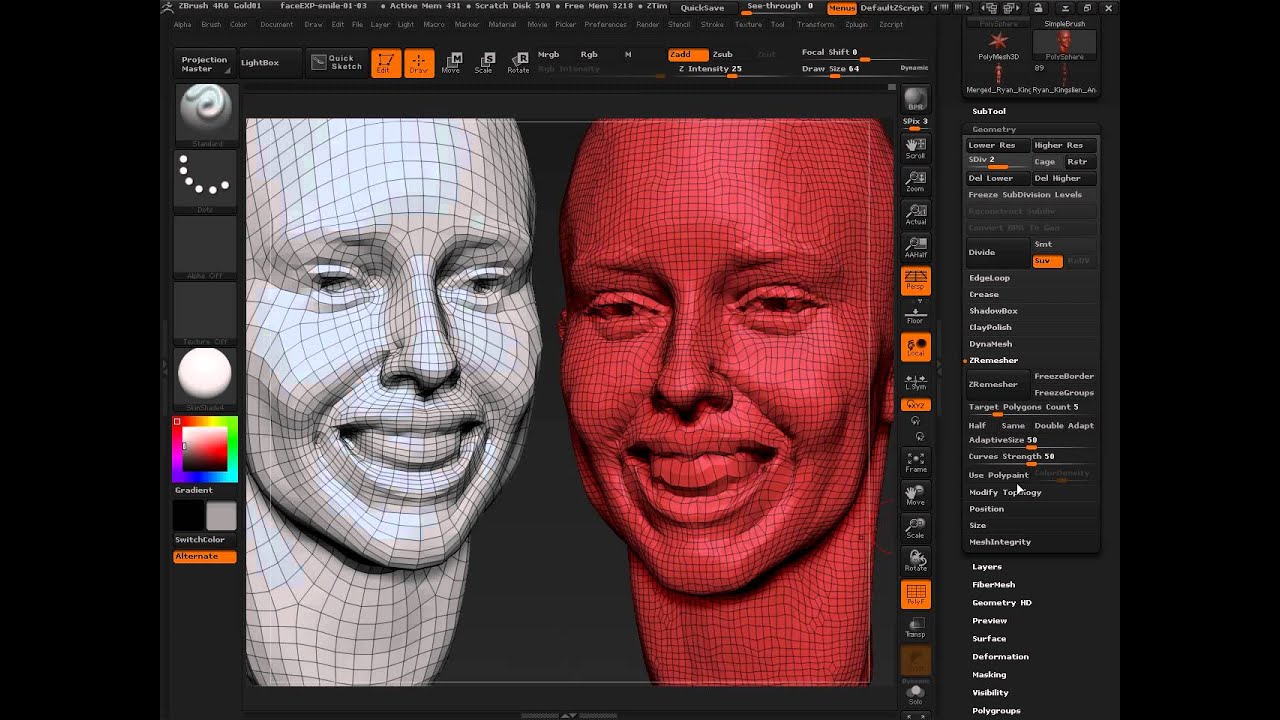
ZRemesher 2.0

ZRemesher2.0
ZBrush is known for being able to handle millions of polygons with ease. However, just because you can work with millions of polys doesn’t mean it’s always best to work with that high of a resolution. Since having a mesh with millions of polys just isn’t realistic, retopologizing a mesh is a standard process when it comes to modeling.
ZBrush introduced ZRemesher in previous versions, which is a fantastic retopologizing tool that literally retopologizes your model for you in a matter of seconds. Pretty awesome, right? The only problem with ZRemesher is the fact that it often produced very strange edge flow, resulting in spiraling edges that not only created strange artifacts, it just simply wasn’t clean topology.
Luckily, Pixologic has remedied this known issue in ZRemesher 2.0 by completely removing those spirals that occur when the tool is used. Now you can retopologize your entire model without any issues, giving you a one-click solution for many topology problems.

Replay last relative

What may seem like a somewhat insignificant addition is actually extremely beneficial. The Replay Last Relative function allows you to recreate the exact same stroke, or change you made to the model instantly. This also comes in extremely handy when you’re working with ZModeler. Say, for example, you extruded a polygon out and the length and with you created is perfect, however, maybe you want to create the exact same extrusion on a different polygon. Well, you can just click on the polygon and it reapplies that exact same extrusion with all the same parameters.
You can do this same thing for strokes you create as well. Maybe you applied a wrinkle on one area of your sculpt, and you want this same wrinkle somewhere else, you can do that using Replay Last Relative as long as the point of view remains the same.

FBX Export/Import

This is definitely a welcome addition to ZBrush users. FBX import/export as finally found its way into the application. You can now import and export FBX files. The FBX plugin supports displacement maps, normal maps and textures as well as blend shapes based on layers and more.

Array Mesh

The Array Mesh in ZBrush 4R7 allows you to create duplicate instanced geometry from your models which allow you to generate new shapes quickly.
The Array Mesh allows you to create extremely complex shapes by duplicating single objects multiple times. The Array Mesh has a wide list of tools which allow you to create variations of the instanced geometry. It also allows you to edit one single piece of geometry and have the changes reflected in all the other geometry in the scene.

NanoMesh

Another great new feature in ZBrush 4R7 is NanoMesh, which at a very basic level is a particle system inside of ZBrush. Similar to Array Mesh you can edit the original mesh whether it’s sculpting more detail or even adding UVs, textures and displacement maps and these changes are instantly applied to all instances. The purpose of NanoMesh is to not only experiment with shape and form, but it also lets you create a tremendous amount of detail in a matter of minutes. For example, the bark of a tree can be created in seconds by first creating the basic bark sculpt, applying a NanoMesh and instances it across the surface of the tree. NanoMesh gives you a wide range of parameters, letting you randomize shape, form, surface placement and more.

ZBrush to Keyshot

ZBrush-Keyshot
Typically, when you need to create a render for your model from ZBrush you’d export it to an external 3D application like Maya or 3ds Max. Simply because ZBrush didn’t have the highest quality rendering capabilities. This however, has changed with the brand new ZBrush to Keyshot bridge. Keyshot is a high quality rendering application that has been fully integrated with ZBrush. It allows you to seamlessly transfer your models directly from ZBrush straight into Keyshot, including all materials, geometry procedural noise, PolyPaint or textures. Basically, if ZBrush can display it, Keyshot can render it.
Of course, in order to take advantage of Keyshot in ZBrush you’re going to need to own a license of Keyshot. Luckily, Keyshot and Pixologic have partnered to provide you with a version of Keyshot strictly for the use with ZBrush for $349. If you already own Keyshot then you just need to purchase the ZBrush to Keyshot Bridge which is $149.
While these were some of the biggest enhancements to ZBrush it certainly doesn’t stop there. Pixologic has also packed ZBrush 4R7 with a slew of more minor additions, but not any less helpful. For instance, the UV Tiling function is now completely interactive. You can now copy/paste your Tools across projects, SubTools and even geometry. Among a wide list of many other improvements to the application.
It’s apparent that ZBrush is trying to become more of that all-in-on 3D application, with the new ability to take a box modeling approach similar to what you would find in an application like Maya to create base meshes, or even complex hard surface models. The need to utilize multiple 3D applications along with ZBrush is becoming less and less and with all these new enhancements it makes ZBrush all that more powerful.
Cảm ơn bạn đã ủng hộ!
Nếu Links die hãy comment phía dưới.

Wednesday, 22 June 2016

Download - Zbrush 4r6 XFORCE

Zbrush 4r6


ZBrush là chương trình điêu khắc và vẽ tranh kỹ thuật số, làm nên cuộc cách mạng trong nền công nghiệp 3D bằng thế mạnh của nó và làm việc một cách trực quan. Được xây dựng với giao diện thanh lịch, ZBrushđược đánh giá là công cụ tiên tiến nhất thế giới cho các họa sỹ kỹ thuật số. Với một kho đồ sộ các hình khối có khả năng mở rộng theo trí tưởng tượng, ZBrush tạo cho người dùng những kinh nghiệm và năng khiếu tự nhiên đáng kinh ngạc với cảm hứng của các nghệ sỹ. Với khả năng điêu khắc hàng tỷ đa giác, ZBrush cho phép chúng ta sáng tạo hết khả năng tưởng tượng của mình.

Trình đơn của Zbrush được thiết kế trên nguyên tắc quay vòng, làm việc liên tục theo phương pháp phi tuyến tính và chế độ tự do. Cách này làm cho các hình khối 3D, ảnh 2D và các Pixols 2.5D dễ tương tác với nhau trên những đường nét mới và đồng bộ.


Tải về: https://www.fshare.vn/file/QZJCW72CBA7V

Crack: https://www.fshare.vn/file/V871CBBBDMST

Nguồn: cgpersia.com va th3d.blogspot.com


Cảm ơn bạn đã ủng hộ!


Nếu Links die hãy comment phía dưới.